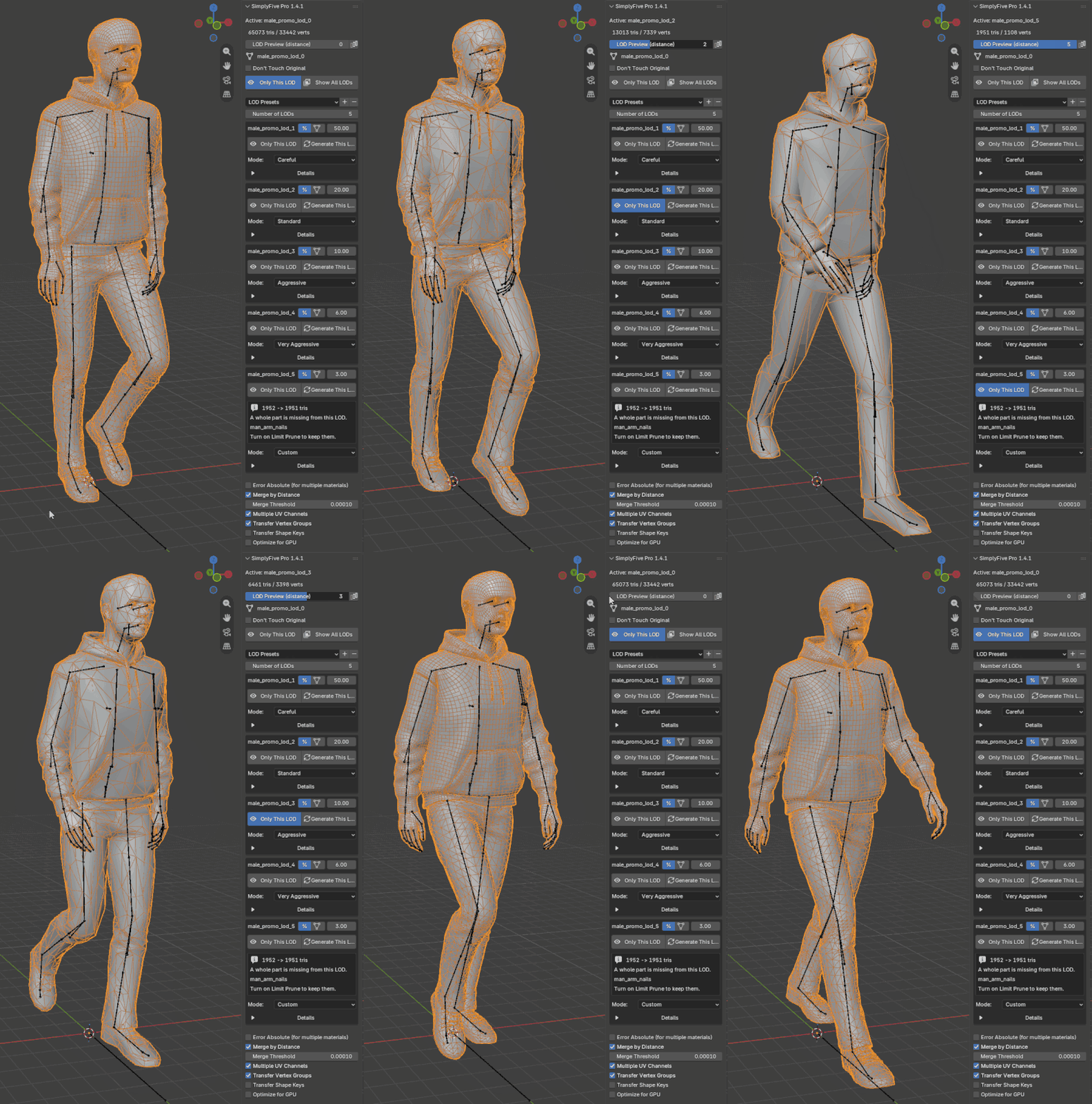
A Blender add-on that generates a set of LOD meshes (Level of Detail) from the active object, using the meshoptimizer library. For each mesh you can create up to 5 simplified versions with individual aggressiveness settings; simplification can take UV unwrapping (including multiple UV channels), normals, vertex colors (transferred, and usable as an importance map), and materials into account.
Why it's different
Most Blender LOD add-ons rely on the Decimate modifier*. SimplyFive is built on the meshoptimizer library: its algorithms take normals and UV layouts into account during simplification, helping preserve shading and textures as the polygon count drops.
Quality on a par with established commercial tools. Everything runs fast and entirely locally: no internet connection and none of the questionable licensing found in similar products.
Speed
Less waiting, more time to compare results and fine-tune settings. The add-on works directly with mesh data: it merges vertices and writes normals before creating the LOD objects, without recalculating the modifier stack. Below: generation times for one LOD at 25% of the source, slowest preset:
Importance mask
A character’s face, a logo, small details — some areas deserve more geometry. The importance mask lets you choose which areas to protect during simplification and which can be reduced more aggressively.
Paint the mask with vertex colors or use a vertex group. Importance Strength controls how much of the mask influences simplification, from the most important areas to the entire marked region.
Need strict protection? PRO includes a hard lock: vertices covered by it are not simplified.
Skinned geometry
Transfer Vertex Groups transfers vertex groups and their weights to the LOD, preserving the armature binding as well. The simplified model stays connected to the rig, so there is no need to set up skinning again.
Shape keys can also be transferred: to nearby LODs only or to every level, with their names and order preserved.
Whole scenes at once
Select the meshes you need and add them to the generation queue. Each object can have its own LOD count and simplification modes. Use Apply Settings to Selected to give similar parts the same settings.
Start generation with one button, then compare the results: the shared preview slider switches LOD levels across the entire queue.
The row color shows each object’s status: gray — not processed yet, green — done, red — a warning needs attention.
When topology is the problem
Sloppy aggressively reduces polygon count with less regard for topology when the usual modes are not enough.
Voxel Remesh rebuilds the surface on a voxel grid, helping close holes and remove long, thin triangles.
meshoptimizer without UV and normal weighting reduces geometry without the constraints imposed by UV seams and shading.
Photogrammetry
Photogrammetry often produces a dense mesh, noisy normals and small fragments of debris. Yet much of the visible detail is already stored in textures and vertex colors — preserving it does not require keeping every triangle.
Scan mode is tuned for these models. Simplification prioritizes shape, UV layouts and vertex colors, while relaxing normal accuracy requirements. This allows more aggressive geometry reduction. An extra pass before simplification removes small scan debris.
Accurate Vertex Colors blends colors smoothly as the mesh is reduced. This is especially useful for scans with color stored in vertices: transitions between shades stay smooth, without abrupt steps on the simplified model.
Workflow
Switch levels directly in the viewport with the preview slider, or show only the selected level with Only This LOD.
For a side-by-side comparison, click Line Up LODs to arrange the source and simplified versions in a row. This makes it easier to assess the silhouette, shading and loss of detail at each level.
Unhappy with one LOD? Adjust its settings and click Generate This LOD. Only the selected level is rebuilt; the others stay as they are.
Nothing is a black box
Choose a simplification mode, then open Details for the LOD if the result needs work. In PRO, you can adjust the allowed error, border and UV seam protection, and the influence of normals and UVs on simplification.
Couldn’t reach the target polygon count? The panel shows how many triangles were requested and how many were produced, explains what limits simplification and suggests a setting to change.
Save a successful configuration as a preset for future models. You can also customize the modes in the add-on preferences. Each parameter is explained in the documentation.
PRO vs Light
Light is a complete add-on; PRO adds more control and features.
Free updates & support
If you buy SimplyFive PRO, future updates are free — they ship with the product.
And you are not left alone with it: write to me on Telegram or by email about anything at all — a bug, a mesh that will not simplify, a question about settings or a feature you need. I answer personally, and the requests that come in are what the next version gets built from.
Get SimplyFive PRO
Pick the checkout that fits your region — they all deliver SimplyFive PRO with the same free updates. Prefer the free version? SimplyFive Light is a free download on GitHub Releases.
Buy the add-on right inside Telegram with Stars — no bank card, no crypto wallet. The fee here is low, so the price is lower and most of what you pay reaches the author.
Card payment — works for Russian, CIS and international cards. Access right after paying, with an extra discount for Boosty subscribers. The fee here is low, so the price is lower and most of what you pay reaches the author.
Card or PayPal checkout, worldwide. Instant download. Gumroad adds its fee on top at checkout, so the final amount is higher than through the other options.
The Blender marketplace, formerly Blender Market. Card or PayPal.